
We wrote it in short sections, each answering one question, and every figure on it is dated 17.11.2026. The single most important point is this: enter your personal details exactly as they appear on your ID, because they cannot be changed after registration and your bonus is tied to them.
Why Register at Hilarionbet
An account is free and takes a few minutes. Once your Hilarionbet registration is finished you can switch between sports betting, slots and live tables with one balance, so there is no wallet to top up for each section. Hilarionbet verification is requested only once, normally before your first withdrawal, and it then covers the whole account. We also give new members a choice of two trial starts: a 500 TL sports trial or a 500 FS trial. These apply to accounts created after 01.05.2025, and in both cases a fixed 500 ₺ is paid when the balance reaches 5,000 ₺.
Here is what registering gives you:
- One account and one balance for sports, slots and live tables.
- A trial start without a deposit: 500 TL sports or 500 FS.
- A 100% slot refund on a first deposit of 500–5,000 ₺ that is lost on slots.
- A registration form that works the same on a phone and on a computer.
- Live chat in your language when you get stuck at any step.
The sports trial is played as a single or an accumulator, and the odds must be at least 1.50. Hilarionbet slots are used for the FS trial, which applies to selected Pragmatic Play games: Gates of Olympus, Sweet Bonanza, The Dog House, Starlight Princess and Wild West Gold. If you already have an older account, you do not need to open a second one; use your existing account for the deposit offers.
Live tables are included as well: Hilarionbet roulette, blackjack and poker tables open with the same login as everything else.
Activating the Welcome Package
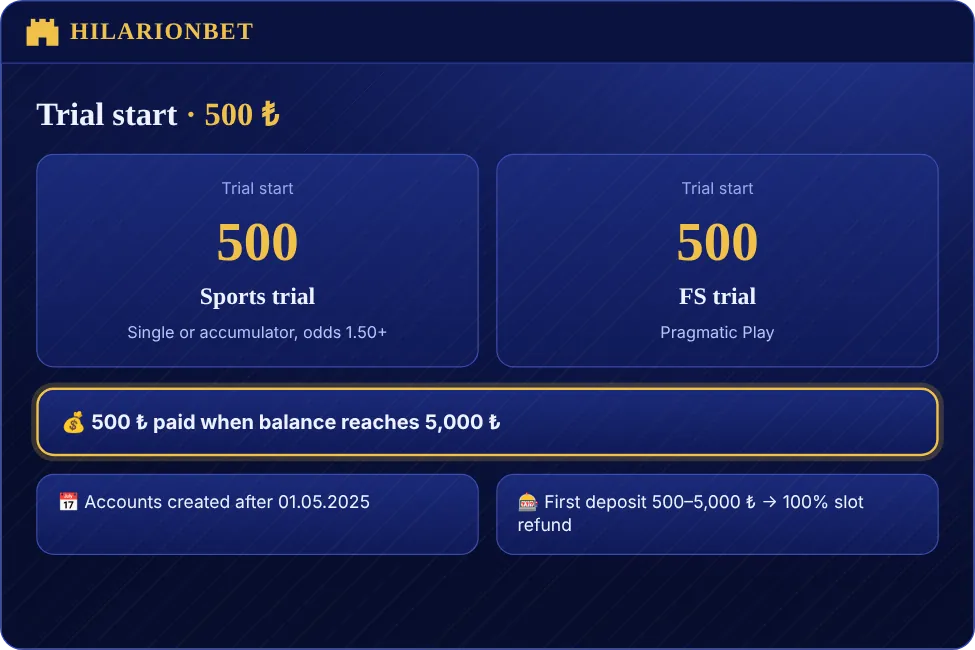
There is no promo code to type. After you finish the form and log in, the campaign appears in the bonus section. Open it, read the terms and press the claim button. The trial balance then shows as a separate line on your balance screen, so you can see what is trial money and what is yours.
Three rules deserve to be repeated. First, the registration details must be correct, since changing them afterwards cancels the bonus. Second, one person can have only one account, and duplicate accounts lead to cancelled bonuses. Third, the payout is fixed: 500 ₺ when your balance reaches 5,000 ₺. If you would rather deposit, use an amount between 500 and 5,000 ₺ and join the 100% slot refund; you register for this offer from your account before you play, and it cannot be combined with the sports loss bonus on the same deposit.
Hilarionbet sports betting has its own bonus too: a loss bonus of 20% for losses of 20–4,999 ₺, 25% for 5,000–49,999 ₺ and 30% above that, for accounts that did not take a deposit bonus. Hilarionbet live betting coupons count towards the same offers where the campaign page says so.
Hilarionbet aviator and Zeppelin are not part of the FS trial, which is limited to the listed slot games, so check the campaign page before you try the trial on a crash game. Before you claim, you may register for the 100% slot refund or the trial, but not both for the same balance; if you are unsure which fits you better, ask live chat to compare them.
Filling In the Registration Form
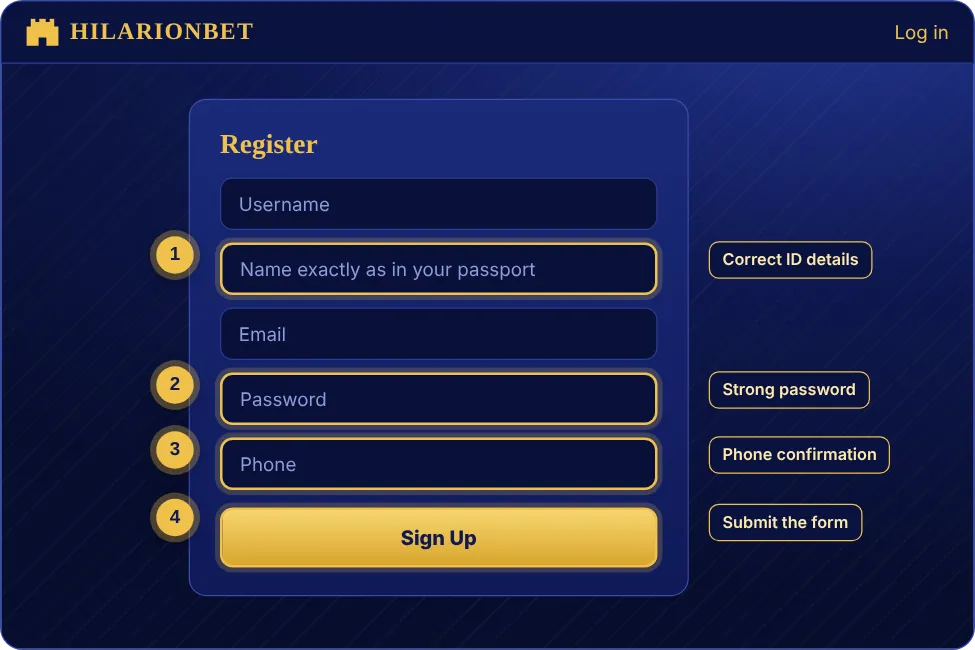
These steps cover the whole sign-up. Each one has a detail worth knowing.
- Open Hilarion.me in your browser to reach the working address, then press the Register button at the top right.
- Type your first name, last name and date of birth as written on your ID; they cannot be edited later.
- Enter an e-mail address and a mobile number you use every day, because the confirmation codes are sent to both.
- Create a password of at least eight characters with upper and lower case letters and a number.
- Confirm that you are 18 or older and accept the terms, then submit the form.
- Enter the codes from your e-mail and phone to confirm your contact details.
- Log in and claim the trial from the bonus section.
The annotated screenshot beside this section highlights the fields in the order above. Your form may look slightly different, but the sequence is the same. Browser autofill sometimes inserts an old e-mail address, so look at the field before you press submit. Type your phone number in the format the form shows; a wrongly typed number means the code never arrives.
After registration your account opens straight away. To sign in later, press the Login button in the same corner and enter your username and password. Hilarionbet sign in works identically on every device. If your browser offers to save the password, accept only on a computer that nobody else uses.
Once the form is sent, a new Hilarionbet register request from the same phone number is treated as a duplicate, so use the resend button if a code is late instead of starting again.
How to Verify the Current Hilarionbet Address
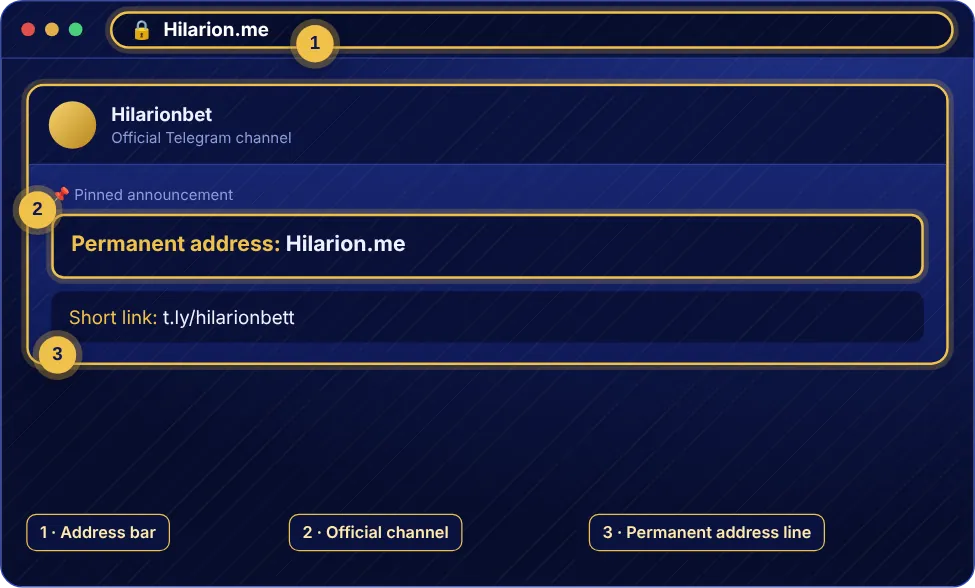
Our web address changes from time to time, so check that you are on the right site before you type any detail. The permanent route is Hilarion.me: enter it in your browser and you are redirected to the working domain. Our official short link t.ly/hilarionbett and the pinned message in our Telegram channel lead to the same place.
On the page, look for the padlock in the address bar, check that the name is spelled correctly and that the footer shows our support address and the 18+ notice. Do not enter details on a page that a stranger sent you in a message. Your account and balance do not change when the address changes, so a new domain is never a reason to register again. The current address page explains how to spot copies of our site.
Closing or Freezing an Account
If you want a break, ask live chat to freeze your account. While it is frozen, play and coupons are stopped, and your balance and history are kept. To come back, write to support and we will reopen it; accounts with finished verification are reopened quickly.
To close an account fully, first withdraw your balance and wait for open coupons to settle, then send the request through live chat or to [email protected]. We confirm your identity before we close anything, and the registration data you gave is compared with the person asking, which protects you if someone else tries to close your account. If you are unsure, freeze first; it is easier to undo. Information on how long we keep data is on the privacy policy page.
You can also use limits instead of closing: a deposit limit, a session reminder and self-exclusion are in your account settings.
If you only want a pause from your Hilarionbet registration, the freeze option is the right one; it removes the pressure to decide today. Our support team can also help you switch off marketing messages without closing anything.
Login with a Verification Code (2FA)
Two-step verification adds a layer in case your password is stolen. When you switch it on in your settings, every login asks for the six-digit code from your phone or an authenticator app, in addition to the password.
If the code does not arrive, check the signal, look in the spam folder, wait a minute and ask for a new one. Only the newest code works; older codes become invalid. Changed your phone number? Ask live support to verify and update it. For authenticator apps, make sure your phone clock is set to automatic, as a time difference makes valid codes look wrong. Keep your recovery codes offline and never post a screenshot of them.
If you try to register again with the same data to get a new code, the system will detect a duplicate; use the resend button or contact support instead. Hilarionbet slots and live tables stay closed until you finish the code step, so the page is not broken when it waits for your input.
When you try to register a second phone number for 2FA, you must first confirm the old one, which prevents someone else from taking over the account. Hilarionbet roulette tables work the same whether 2FA is on or off, but we suggest keeping it on.
KYC Identity Verification Steps
Hilarionbet verification is the identity check that normally precedes your first withdrawal. You need the front and back of your ID, a proof of address that is recent, and sometimes a photo of yourself holding the ID. Files must be clear and uncropped, in JPG, PNG or PDF format and under 5 MB.
Here is the flow. Open Verification in your account, upload the documents, and wait for the review. If something is missing we write to you by e-mail or live chat, and once everything is approved the status reads verified. The name, surname and date of birth on the documents must match the registration form. Where they differ, bonuses and withdrawals can be paused, so we ask you to type your details from the ID itself.
Payment methods have to be in your name as well. A card or wallet belonging to somebody else makes verification harder and can block a payout. Upload the documents before you win rather than after, because it shortens the wait. Hilarionbet sports betting winnings and slot wins are treated the same way: the check is about you, not about the game.
Safe Login on Desktop and Mobile

On a computer, save Hilarion.me as a bookmark and always open the site from it rather than from a search result. If you use a password manager, look at whether the saved domain matches; when it does not, do not fill in the password.
On a phone, add the site to your home screen. If the device is shared, do not save the password in the browser and sign out when you finish. Avoid logging in on public wireless networks and use mobile data when you can. A screen lock, fingerprint or face unlock protects the account if the phone is lost. Having the same account open on two devices at once may trigger a security notice, which is normal.
Do not leave a live roulette table or a Hilarionbet live betting coupon screen open on a device you walk away from. A short session timeout is a good habit, and it costs nothing.
Whenever you sign in from a new device, the site may ask for a code. This Hilarionbet sign in check is normal and protects your balance. Hilarionbet aviator rounds are quick, so make sure you are logged in on the right device before you start and set a session reminder.
Password Reset and Account Recovery
If you forgot your password, press Forgot password on the login screen and type the e-mail or phone number you registered with. A code or link arrives; the link works for a limited time, so request a new one if it expires.
- Press Forgot password on the login screen.
- Enter your registered e-mail or phone number.
- Open the code or link we send you.
- Type a new password twice and do not reuse an old one.
- Log in with the new password and review your 2FA settings.
If you no longer have access to the e-mail address, contact live chat; after we confirm your identity we can update your contact details. If you think someone else has your account, change the password first and then tell us. Our staff will never ask you for your password or a verification code, in chat, by e-mail or on social media.
Common Login Errors
The table covers the problems we are asked about most. If your case is not listed, send a screenshot to live support.
| Error | Likely cause | Fix |
|---|---|---|
| Page will not open | Old address or DNS problem | Use Hilarion.me and clear the cache |
| Wrong password message | Caps lock or old password | Reset the password |
| No code arrives | Signal, spam or wrong number | Wait a minute, resend, check the number |
| Account locked | Too many failed attempts | Ask live support to unlock it |
| Bonus not visible | Registration date or incomplete form | Check the date and details with support |
| Withdrawal pending | Verification incomplete | Upload all documents |
When a Hilarionbet login fails after a reset, make sure your browser has not filled in the old password automatically. If the live betting page or the sports betting coupon does not load after you sign in, update the browser or try another one, and contact us if the problem remains. A roulette table with no picture usually means the connection is too slow for the video, so switch to a faster network.
After a reset, Hilarionbet register mistakes such as a second account for the same person are the most common reason for blocked bonuses; if you are unsure whether you already have an account, ask support before you register. Our Hilarionbet registration records show the date and details, and we can tell you what is on file.
FAQ
Is registration free?
Yes. We only ask for correct ID details, an e-mail address and a phone number.
Which address should I use for Hilarionbet login?
Type Hilarion.me in your browser; you are taken to the working domain. The short link t.ly/hilarionbett works too.
Can I edit my details after registering?
First name, last name and date of birth cannot be changed, and changing them cancels the trial bonus. Contact details can be updated through live support.
Who can use the trial?
Accounts created after 01.05.2025. The sports trial needs a single or accumulator with odds of at least 1.50, and the FS trial runs on the listed Pragmatic Play games.
How long does verification take?
If the documents are complete and clear, we aim to answer on the same day. Busy periods can take longer, and we write to you when something is missing.
In short: use the right address, type your ID details exactly, protect your password and upload your documents early. You can read about the games in our games overview and about safety on the safety page. You must be 18 or over, and our responsible gaming page explains the tools that keep play under control.